
Financial review
- How to get help
- Account activation process
- Account activation process - Migrated user
- Login process
- Messaging on the client portal
- Messaging on the mobile app
- Forgotten details
- Unlocking your user account
- Landing page and navigation
- My profile
- My Wealth
- Portfolio details
- Documents
- Minimum system requirements
- Legal information
- Submitting feedback
- Mobile app - Features overview
- Mobile app - First time setup or reinstallation
The purpose of this guide is to provide an overview of the Financial Review Tool in the Evelyn Partners client portal.
Your annual financial review
The Financial Review Tool helps you keep your personal and financial information accurate and up to date. This information allows your adviser to provide a service that is tailored to your current circumstances and financial goals.
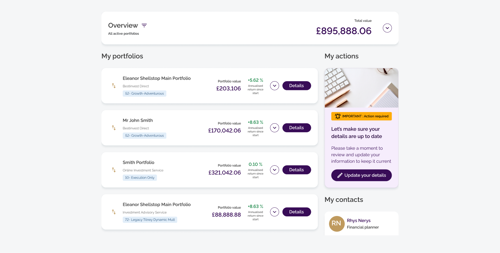
You will be sent an email to let you know that the financial review is available for you. After logging in, you’ll see a banner on the right-hand side of your dashboard prompting you to update your details. This indicates that your financial review is available and ready to complete.
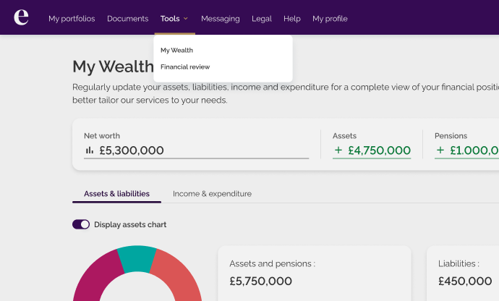
| Note: Once your financial review is available, you can also access it anytime from the Tools menu at the top of the page. |
Completing your financial review
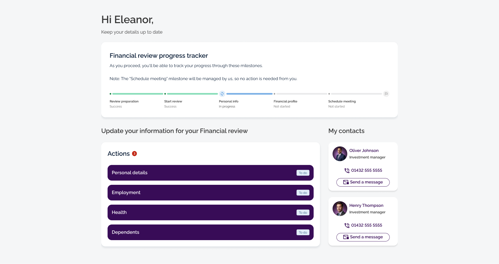
Once you land on the financial review page, you’ll see a progress tracker at the top, showing the key milestones and how far along you are in the review process.
Below the tracker, you’ll find a list of tasks that need your attention. These may vary depending on what your adviser has requested and can include:
- Personal details
- Dependents
- Employment
- Health
- Risk tolerance
- My Wealth
Because you’ll be reviewing information that’s already completed for you, the process usually takes just a few minutes. You might notice that some of your personal information cannot be updated in the portal, as this is for security and fraud-prevention reasons.
As you complete each task, your progress will automatically update in the tracker.
| Note: If you experience any issues completing your financial review, please contact your personal financial adviser for assistance. |